Disclosure: We are a professional review site that receives compensation from the companies whose products we review. We test each product thoroughly and give high marks to only the very best. We are independently owned and the opinions expressed here are our own.
When building a site or working on a graphic design project, make sure your color pallet has the right colors in them. Use colors that complement each other.
For me, finding the correct colors for a project can be hard. I understand color theory but, when choosing those colors for a design, my mind goes blank. Generally I either pick a color or if I am presented an image or a logo and I need to use colors from the image, I will use a color generator to do this.
What is a color generator?
A color generator or color scheme selector is a tool for anyone in need of a color scheme. In most cases these online tools are code driven and full of features to help someone build the perfect color scheme. There is somewhere around fifty online generators available for you to use. I have selected just a few of them. Most of these I will use or have used in the past find that perfect color scheme. There no order of favorites, just ones I favor over the rest.
1. Degraeve.com Color Palette Generator
This generator is a simple tool that creates a color scheme from an image. The best part of this tool is you can find an image online and instead of downloading the image, you can get the link of the image and paste it into the URL image field. Once you hit the button that says “Color-Palette-fy!” it will display ten colors that are found in the image. As you can see, I took an image from flickr and ran the generator. The colors are perfect. It pulled colors that match the color of the image. Even if I can not use the image in a project I can use the colors for inspiration. This tool is very handy, easy to use, and finds the most important colors of the images quickly.

Image Source: Old Car
2. Color Scheme Designer
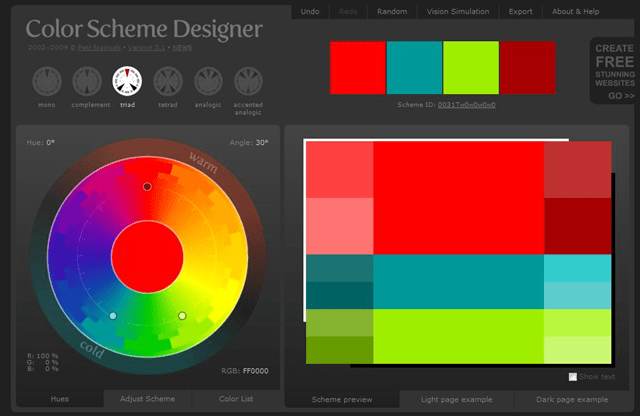
Color Scheme Designer is the color generator that most designers use the most. This tool provides a better preview, permanent URL for the scheme you create, loaded with a ton of features, and in my opinion, one of the best looking interfaces around.
3. kuler Color Generator by Adobe
Adobe® Kuler™ is tool for generating color themes. You can create a theme from an image or from a color selector. You can even choose a mood, and it will pick colors that are defined by a particular mood. You can save your theme and share it with the Kuler community. Or if you are interested in what others are creating, you can browser other Kuler users and even grab their theme colors for your project. Kuler impresses me, its got a lot of features, great community, and its easy to create a color theme. The interface is all designed beautifully. I love the dark colors!
Theme created from an image.

Theme created from a color.

A them created by a community member

Image Source: Image random pulled by website from Flickr
4. CSS Drive: Colors Pallet Generator
CSS Drive’s generator is a generator like DeGraeve’s color generator. But with this generator, you can either upload an image from the web or upload from your computer. Once you get the image uploaded, you choose a light, medium, or a dark color palette. If you want more colors, you can also use the complete list of colors in this image. Once you select the colors you want or if you want to grab all the colors, you. You have the option of download a file that lists all the CSS color codes or a Photoshop color swatch file. This a great tool if you want something simple to grab colors form image, and still see all the colors available in the image.
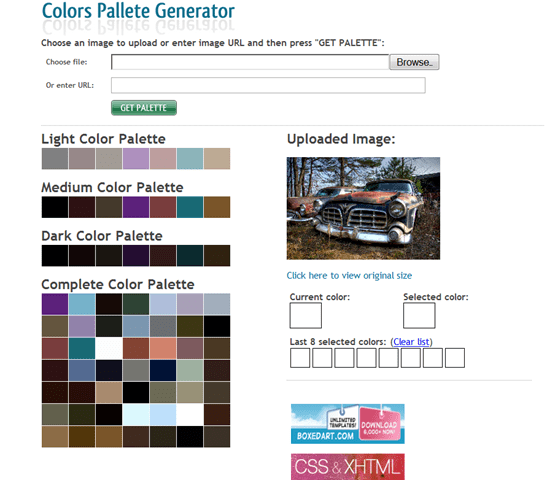
Image Source: ’55 Chrysler Imperial (IMGP1587h)
5. Color Schemer Online v2
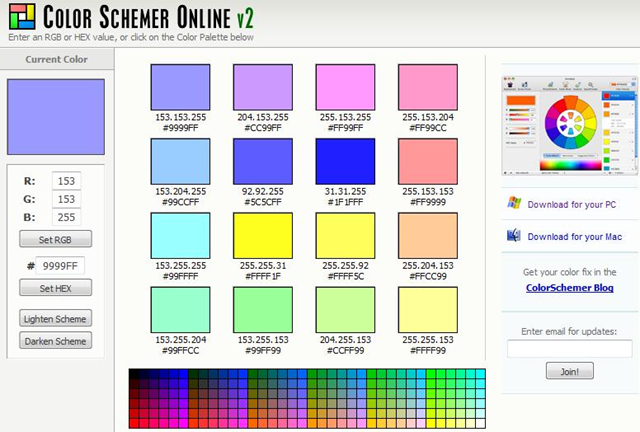
Color Schemer is simple to use. Pick a color and it gives you sixteen colors to create your color palatte from. If you like this tool and want a desktop version, they do offer one. I use this tool from time, just so I can grab the hex codes.
6. Pictaculous – A Color Pallet Generator
Pictaculous is another color generator that grabs color from the images. What I do not like about this tool is you have upload the image to them. Other than that, it does a great job at grabbing the colors from the image and you can then download the Adobe Swatch File. For this demo, I grabbed an image from flickr (allows downloads).

Image Source: old car
7. Image to Color Palette Generator
This generator is still in beta, but works great. The design, well there is none. But what it lacks in design, it does work great for finding you colors in an image. You can upload an image via a URL Field submitter that will then display the image along with colors that can be found in the image. What’s different about this image color generator is, you can adjust the hue by using a slider bar back and forth to get the perfect color scheme!
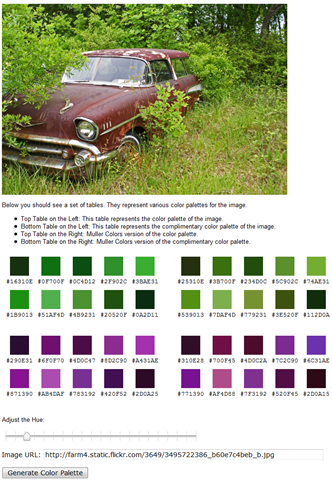
Image Source: Old Car Grave Yard
8.ColorJack: Color Generator
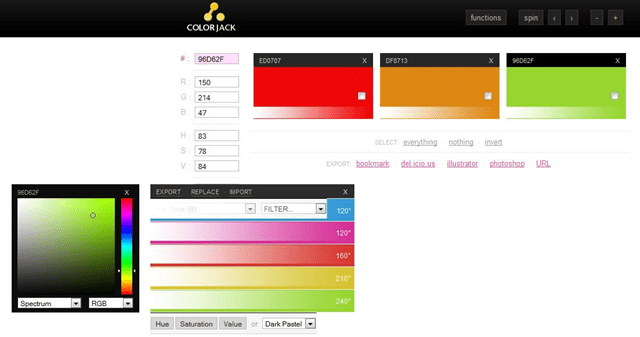
ColorJack is a color selection tool that allows you to select a color and it gives three colors that go with it. When you click on one of the colors it gives you the Red, Blue, and Green range and the hex code. You can also adjust the hue, saturation and value of and get a more precise range of colors.
9. Colr.org
Per the about page, Colr.org was designed for people fool around with color. The tool itself, was created for fun and the author says the tool code was made from several different places. The site is coded in mostly JavaScript and the backend uses python. Overall the tool has some neat features and its way it selects the color is also cool. I really do not use this tool much but I do like the way it pulls color.

Image source: First two images pulled randomly by the website from flickr. I grabbed the last image from flickr.
10. Color Wizard – Colors On The Web
Color Wizard is a tool that lets you start with a base and it will return matching colors for your selection. It will also returns hues, saturation, tint, and shades of your color. Color wizard offers color selection feature selections using monochromatic, analogous, triadic, tetradic, complimentary, and split complimentary. If you looking for something different, then you can select randomize and it will generate random color schemes. I like color wizard, it isn’t much different from other color picking generators. What I like the most is the red, green, and blue sliders.

11. Combo Tester by ColorCombos
Combo Tester lets you select colors and then displays the results in large columns. I like this tool because it gives you a larger color swatch results. Most generate small squares that are not very helpful. These larger swatches can help users get a better view of what their colors will look like.
12. PHOTOCOPA – By COLORlovers
Photocopa is another way to get colors from an image. But in order to upload an image or use an image you found on Flickr, you have to sign up for an account. Its not that big of deal, but if you do, do not want to be part of the community or share your email address with this site, you will need to use another tool to get a color scheme from them.

Image Source: ’53 Buick Super V Eight (IMGP1597h)
13. COPASO : Color Palette Software
Copso is another tool by COLORlovers, its great tool and a lot of designers swear by it. You upload an image for inspiration and build your pallet around that image or you can create your own. Plus you can join their network and share palette creations with them. If this tool a too much for you, they have a basic version you can use.

14. Toucan Color Palettes
Toucan is part of a suite of powerful tools by Aviary for designers. This color generator is powerful just by itself. You can create your own color pallet or you can off of an image. When you first launch the tool it will open up an other window and the tool will run in that window. There are so many ways to you can get a unique color palette from this tool. Once you get your set of colors selected, you can then do a full screen preview of your color pallet. To see all its features, check it out and let us know what you think of it.

Image Source: Rusty Car
15. Color Rotate
Color Rotate is a new color generator. What’s cool about this tool is its in 3D and animated. You can create a pallet and see it on the color cone to the right. You can rotate it from side to side or spin it like a top. You can create your own colors or you can select from user created pallets.

16. Color Wheel
Color Wheel is not a tool I would normally use, but it does come in handy if you are not sure what color for your design you want to use. This tool is a random generator, hit the spin button and it gives you three matching colors and examples of what the three look like together in a design.

17. Palette Inspiration
Palette Inspiration is great tool for finding new color palettes. The tool has a lot of features, such as choosing analogous and complementary colors. If you are looking for premade palettes you can also find them here.

18. Color Explorer
Color Explorer is a tool box full of tools. You have a color picker, color matching and you can even select from premade palettes. There is so much you can do here. Check them out and see what else the tools can do!

19. Color Calculator
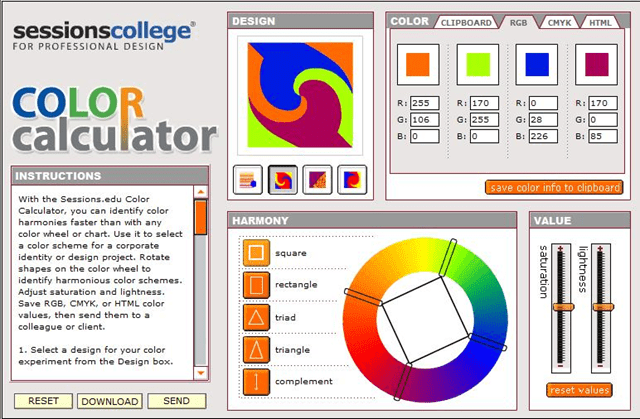
The color calculator is a tool for designers. It breaks the color into five different options. Select one and it will use predefined number of points on the circle and you move one point around and the all the points move as needed. It then takes those points and creates a small design from the colors from the palette. You can also you the the sliders to adjust saturation and lightness. The downside to this tool is you have to sign up by giving them your email address. Other than that tool works great.
Conclusion
As mentioned before there are so many color creation tools out on the web some them are great and some not so much. These are just of my favorites. Tell us what you like and why….

 About James


These will be useful for me as I go through my redesign.
Thanks for sharing James. Have a good one.
Hi Gines,
They help me a lot. They are great resource, make sure to bookmark the list so you can back try them some of them out.
Thanks for these sites, I really could have done with these when I was trying to come up with new color schemes for my site redesign
Yeah, when I wrote this article, it just kinda came to me that I should blog out my favorite design tools. I thought I would gather up all my resources and look for some ones. Then share them with the readers!
great list James, I used to have just one source for all my projects. I’m going to experiment with some of these to see better results, thanks!
Thanks Cindy, what tools where you using in your design process? Let us know which ones you like the best…
Great collection. I usually open adsense account and choose color of interest, it takes time but now I know where I can get it easily. Thanks
Tinh, using adsense is a lot of work. Good thing you came across this list. Thanks for stopping by and commenting…
I recently use a colour pallette generator site (I can’t remember which one) that easily allowed me to design a theme for a blog for someone. The person picked out the colours and we decided what colour worked best in the theme.
The beauty is that you get to see how the colours look together even before you create the theme.
Just wanted you to know this post is bookmarked and I keep referring to it. Saving me picking colors. 🙂